Understanding how heatmap tools inform marketing decisions is quickly becoming a competitive advantage for local businesses. Most owners rely on gut instinct - boosting a social post because it feels right, targeting a neighborhood because it seems busy, or adjusting their SEO strategy based on a single keyword report that tells them almost nothing about geographic performance. The result is wasted budget and missed opportunities hiding in plain sight.
A local rank heatmap changes this entirely. It shows you exactly where your business ranks - block by block, neighborhood by neighborhood - across your entire service area. Instead of guessing where customers can find you, you see it mapped out in color-coded detail. Here are five ways this visibility transforms how local businesses make marketing decisions.
1. See Exactly Where You’re Invisible to Customers
Why Traditional Rank Tracking Falls Short
Your Google Business Profile might rank on the first page for someone searching two blocks away, but completely disappear for the same search five miles out. Traditional rank tracking tools give you a single position number that hides this reality. According to Google’s own documentation on local results, proximity is one of the top three factors in local rankings - meaning your visibility changes dramatically based on the searcher’s location.
How a Heatmap Reveals the Full Picture
A heatmap breaks your service area into a grid and checks your ranking at every point, showing green where you’re strong and red where you’re nowhere to be found. This geographic view is a game-changer for marketing decisions. Instead of running broad campaigns that try to reach everyone, you can see the specific neighborhoods and zip codes where your business is invisible - and direct your marketing budget precisely where it will have the most impact.
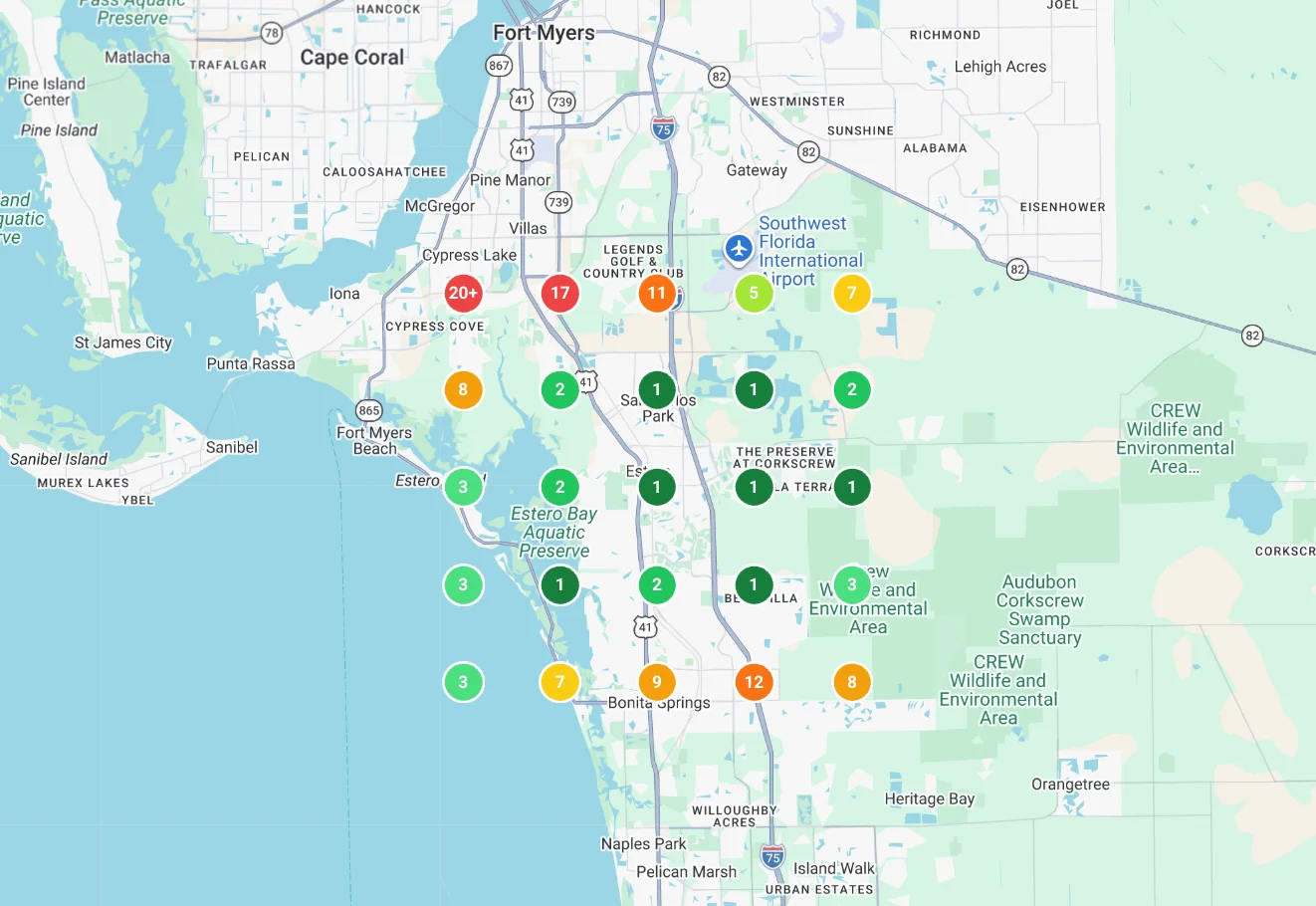
RenewLocal’s Local Rank Heatmaps do this automatically for your Google Business Profile. You get a visual map of your rankings across your entire service area, updated regularly so you always know where you stand. No manual spot-checking, no guessing, no spreadsheets.
2. Stop Wasting Budget on Areas Where You Already Dominate
The Hidden Cost of Over-Investing
One of the most expensive marketing mistakes is spending money where you don’t need to. If you’re already ranking in the top three across an entire neighborhood, pouring more ad spend or SEO effort into that area gives you diminishing returns. Research from BrightLocal’s Local Consumer Review Survey shows that the majority of clicks go to the top three local results - if you’re already there, additional spend in that zone generates minimal lift.
Redirect Budget Where It Moves the Needle
A heatmap makes this obvious at a glance. The green zones on your map are areas where you can scale back spending. The red and yellow zones are where additional investment - whether that’s localized content, Google Business Profile posts targeting those areas, or neighborhood-specific ad campaigns - will move the needle.
RenewLocal pairs heatmap data with AI-powered post scheduling, so you can create keyword-optimized Google Business Profile posts that specifically target underperforming areas. Your heatmap identifies the problem, and the platform gives you the tools to fix it without hiring a consultant.

3. Track Whether Your Marketing Efforts Are Actually Working
The Problem With Flying Blind
Launching a new campaign without geographic tracking is like flying blind. You might see an uptick in calls or website visits, but you have no idea which areas improved or whether your target neighborhoods responded at all. Google’s Business Profile performance insights show aggregate data but don’t break it down by the searcher’s exact location.
Before-and-After Heatmap Comparisons
Heatmaps provide before-and-after visibility that no other tool can match. Run a campaign targeting a specific part of your service area, then check your heatmap a few weeks later to see if those grid points shifted from red to yellow to green. If they didn’t move, you know the campaign needs adjustment. If they improved, you can double down with confidence.
This feedback loop turns marketing from a guessing game into a measurable process. RenewLocal’s GBP Management Dashboard tracks these changes over time so you can compare heatmap snapshots and see exactly how your rankings have shifted across every part of your service area.
4. Understand Your Competitive Landscape at a Hyper-Local Level
Why Average Rankings Are Misleading
Knowing that a competitor ranks higher than you on average tells you very little. Knowing that they dominate the northwest quadrant of your city while you own the southeast tells you everything. Heatmap tools reveal competitive dynamics at a geographic level that aggregate data simply cannot. A Semrush study on local pack rankings confirms that local search results can vary block by block depending on proximity and relevance signals.
Using Geographic Data to Outmaneuver Competitors
This insight shapes real marketing decisions. If a competitor is entrenched in a specific area, you might choose to focus resources on adjacent neighborhoods where they’re weaker and you can gain ground faster. Or you might decide that a high-value area is worth the investment to compete head-on, armed with the knowledge of exactly what you’re up against.
RenewLocal’s heatmaps show competitor positioning alongside your own rankings, giving you a side-by-side view of where you win, where you lose, and where the biggest opportunities sit. This turns competitive analysis from an abstract exercise into an actionable geographic strategy.
5. Make Smarter Decisions for Multi-Location and Service-Area Businesses
The Complexity of Managing Multiple Territories
If you operate multiple locations or serve a wide geographic area, marketing decisions get exponentially more complex. Each location has its own competitive landscape, its own ranking profile, and its own set of underperforming zones. Managing this without geographic data means treating every location the same - which guarantees you’re over-investing in some and under-investing in others.
How Heatmaps Simplify Multi-Location Strategy
Heatmap tools let you see each location’s performance independently and identify which ones need the most attention. A location that looks healthy by its overall rating might have critical blind spots in high-traffic neighborhoods. A location with a lower average ranking might actually dominate the areas that matter most for revenue.
For service-area businesses like plumbers, roofers, and landscapers, heatmaps are especially valuable. Your ranking changes dramatically based on the searcher’s location, and a heatmap is the only way to see how your visibility shifts across your entire service radius. RenewLocal gives you this full picture in a single dashboard - no juggling multiple tools or manually checking rankings from different locations.
Turn Visibility Into Action With RenewLocal
Heatmap data is only valuable if you act on it. That’s why RenewLocal combines Local Rank Heatmaps with the tools you need to improve what you see:
- Local Rank Heatmaps - See where you rank block-by-block across your entire service area with color-coded grids
- AI Post Scheduling - Automatically publish keyword-optimized posts to your Google Business Profile targeting underperforming areas
- AI Review Responses - Keep your profile active with personalized, on-brand replies to every review in under 60 seconds
- GBP Management Dashboard - Real-time alerts when rankings, reviews, or profile edits change so you never miss a shift
Every feature is included in a single plan at $30 per month with no upsells or hidden tiers. Start with a 7-day free trial; local rank heatmaps unlock on your paid plan.
Stop guessing where your customers can find you. A heatmap doesn’t just show you the problem - it shows you exactly where to focus so every marketing dollar works harder.
See RenewLocal plans and get your rankings mapped out across your entire service area.
Frequently Asked Questions
What is a local rank heatmap?
A local rank heatmap is a visual tool that displays your Google Business Profile ranking across a geographic grid. Each point on the grid represents a different searcher location, color-coded from green (top rankings) to red (not visible). It shows how your visibility changes based on where the customer is searching from.
How do heatmap tools inform marketing decisions?
Heatmap tools inform marketing decisions by revealing exactly where your business is visible and where it’s not. Instead of guessing which neighborhoods to target, you can see underperforming areas on the map and allocate your ad spend, content strategy, and SEO efforts to the specific zones where they’ll generate the most return.
How often should I check my local rank heatmap?
For most local businesses, checking your heatmap weekly or biweekly gives you enough data to spot trends without overreacting to day-to-day fluctuations. If you’ve recently launched a campaign or made changes to your Google Business Profile, check more frequently to measure the impact.
Can heatmap tools help service-area businesses?
Yes - heatmap tools are especially valuable for service-area businesses like plumbers, electricians, and landscapers. Since these businesses don’t have a storefront customers visit, their Google rankings vary widely across their service radius. A heatmap reveals exactly which parts of their territory they’re winning and which areas need attention.
How is RenewLocal’s heatmap different from other rank tracking tools?
RenewLocal combines local rank heatmaps with actionable tools in one platform. Instead of just showing you where you rank, it pairs heatmap data with AI-powered post scheduling, review response automation, and a GBP management dashboard - so you can identify problems and fix them from the same interface, starting at $30 per month.
Where should I start before turning on a heatmap tool?
Heatmap data is only useful on a profile that’s structurally healthy. Before you turn on rank tracking, run your GBP through our free health checklist to surface the compliance issues, missing fields, and ranking blockers that quietly cap heatmap performance. Once those are cleaned up, the heatmap shows you the opportunity gaps rather than the foundation gaps.
Ready to protect your Google Business Profile?
AI-powered review management and profile protection. Start your free 7-day trial.