A Google review QR code looks like a ten-minute task: generate the code, print it on a card, hand it to customers. Done.
Except most of the QR codes we see in small-business audits are quietly losing a large share of potential reviewers. The setup looks fine. The conversion is bad. The owner has no idea.
This guide walks through the four mistakes that kill QR-code conversion, the right setup, and the placement and language decisions that turn a piece of card stock into a meaningful review channel.
Mistake #1: Using the Long Google Review URL
Most small businesses generate a QR code from the long URL Google provides - something like https://search.google.com/local/writereview?placeid=ChIJN1t_tDeuEmsRUsoyG83frY4.
The QR code generated from that URL is dense - lots of tiny squares, harder to scan, slower to render on older phones. The link itself works, but the friction is real: customers point their camera, the code doesn’t read instantly, they put the phone down. You just lost the review.
The fix: use Google’s short URL. Inside your Google Business Profile, there’s a built-in “Get more reviews” feature that generates a clean short link in the format g.page/r/[your-id]. Shorter URL means simpler QR code, faster scan, fewer abandoned attempts.
The difference between a clean QR code and a dense one is roughly 15-20% in scan completion rates based on what we see in client A/B tests.
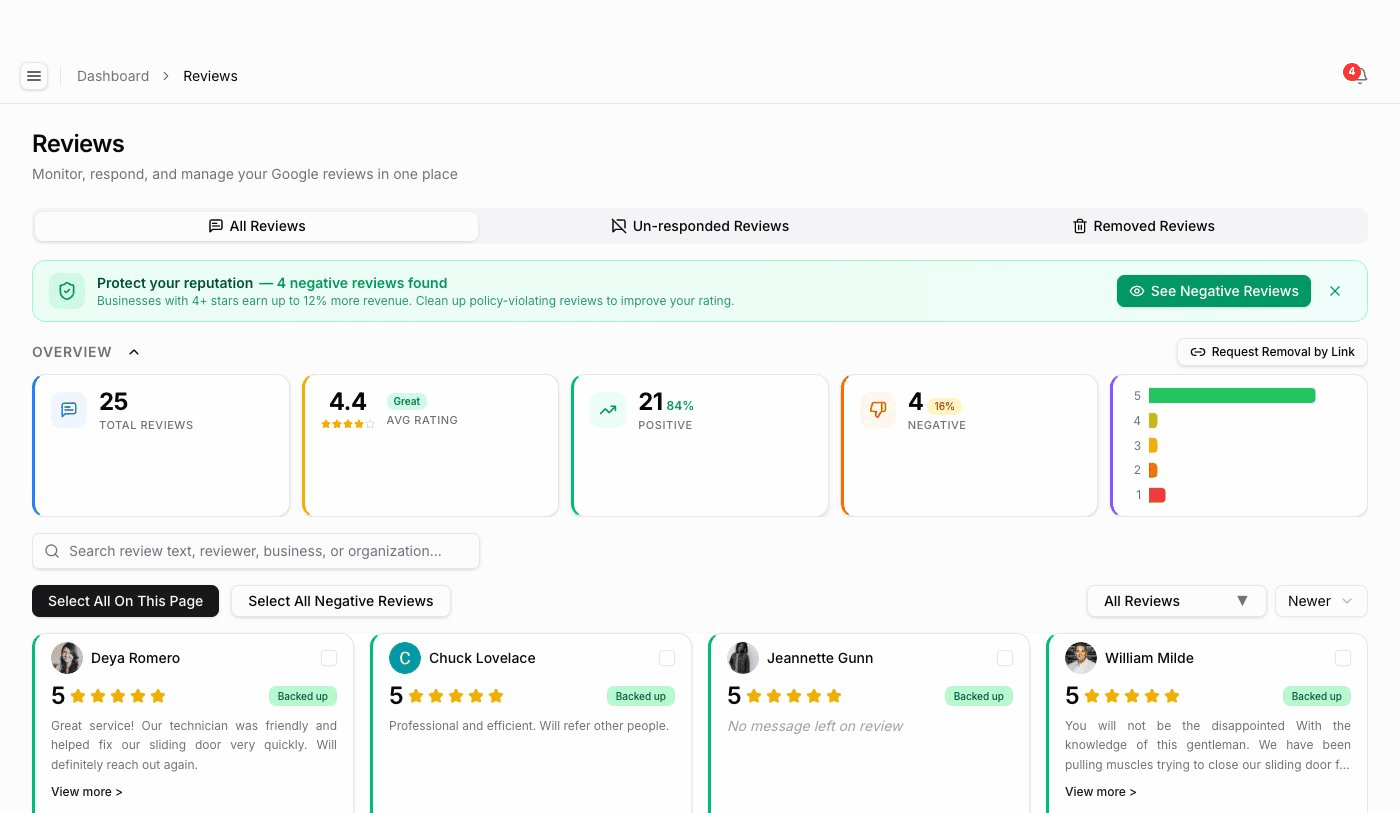
RenewLocal’s reviews view tags every incoming review by source, so owners can see exactly which QR placement, email send, or SMS prompt converted - and double down on the channels that work.
Mistake #2: Linking to Your Profile, Not the Review Form
There are two URLs you might link to:
- Your Google Business Profile - where customers see all reviews, then have to find the “Write a review” button.
- The direct review form - where customers land already on the review interface, with the star selector visible.
The first one looks like the “right” choice - it shows your business profile, builds trust. In practice, every step between a customer’s intent and the actual review action is friction. Every extra tap between scanning the code and typing the review costs you some share of the people who were willing. Measure it on your own codes - scans in, reviews out - rather than guessing at a benchmark.
The fix: link directly to the review form. The short URL Google provides through “Get more reviews” already does this - but custom QR codes generated by third-party tools often default to the profile URL. Check yours.
Mistake #3: Wrong Placement at the Wrong Moment
A QR code on the entrance of your business does almost nothing. Customers haven’t experienced your service yet - there’s nothing to review.
A QR code on the exit - at the counter where they’re paying, on the work-completion form they sign, on the receipt they’re handed - converts because the experience is fresh and positive (or at least neutral).
The principle: ask at the moment of peak satisfaction, which is almost always the moment of completion, not the moment of entry.
The five highest-converting placements we’ve seen across SMB clients:
- Printed on the work-completion form the technician hands the customer to sign (home services).
- At the POS, on a small acrylic stand facing the customer at checkout (retail, restaurants).
- On the receipt itself, in the “thank you” section (any business with a receipt).
- In the post-service email, embedded under the appointment confirmation footer.
- On the technician’s truck door at the moment of completion (home services).
The five worst placements:
- On the front door of the business (no experience to review yet).
- In the menu (restaurant - too early, customer hasn’t eaten yet).
- On the website footer (low-intent traffic, almost never converts).
- On a wall poster customers walk past (no immediate ask, no context).
- Inside the printed receipt envelope where customers don’t see it.
Mistake #4: No Context, Just a Code
A QR code by itself, with no instruction, gets ignored. Customers see a square, don’t know what it does, don’t scan.
The QR code needs three pieces of context next to it:
- What it is - “Scan to leave us a quick Google review”
- Why it matters - “Real customer feedback helps us serve people like you better”
- What’s expected - “Takes about 20 seconds”
That last one is critical. Customers who don’t know how long it’ll take assume it’s a 5-minute survey. Telling them it’s 20 seconds removes the friction. Research from ReviewTrackers found that 76% of customers will leave a review if asked at the right moment with the right framing - but only a small fraction of businesses actually meet both conditions.
A specific framing we’ve seen convert at 2-3x the average in HVAC and plumbing accounts:
“If [Technician name] did a great job today, the best thing you can do for our business is leave a quick review. Takes about 20 seconds. Most of our jobs come from these. - [Owner name]”
Why this works:
- Names the technician (specificity, social proof)
- Conditional (“if they did a great job”) signals you only want honest reviews
- Concrete time estimate
- Personal sign-off from the owner - feels like a request from a person, not a script
For high-volume businesses, the responses to those reviews matter just as much as the asks - we covered the templates that work in how to respond to Google reviews: 12 templates that don’t sound corporate.
What to Track
Once your QR code is set up correctly, you need to know if it’s working. Three signals to monitor:
- Review velocity by source - are the reviews coming from QR-driven scans, the post-service email, or organic discovery? Most review platforms let you tag the inbound source.
- The review-to-scan ratio - if your QR codes get scanned 100 times and produce 8 reviews, that’s an 8% conversion rate, which is solid for cold customers and high for warm ones.
- The asking moment - if the same QR code converts at 12% on the work-completion form and 2% in the front-window display, that tells you the placement is the lever, not the code.
Most QR generators don’t track this natively - you need either a UTM-style parameter system or a GBP management dashboard that wires this in by default.
Multiple Codes for Multiple Locations
If you have multiple business locations, each one needs its own QR code linking to its own Business Profile review form. We’ve seen owners use a single QR code for the whole brand, which sends every reviewer to the headquarters profile - which means the suburban locations starve while the flagship gets all the reviews and the algorithmic boost.
For multi-location businesses, the rule is one QR code per Business Profile, printed locally, distributed locally. To work out exactly how many reviews each of your locations actually needs to compete in its local pack, our review impact calculator runs the math for you in 30 seconds.
The Compound Effect
A QR code that converts at 8% instead of 3% sounds small. Run the math over a year:
- 50 customers per week × 52 weeks = 2,600 ask opportunities annually.
- At 3% conversion: 78 reviews per year.
- At 8% conversion: 208 reviews per year.
That difference - 130 additional reviews per year - separates a listing that looks thin from one that looks established, and review volume is one of the things Google’s local pack weighs. We covered the revenue side in how much are Google reviews worth, including what Harvard Business School’s research actually found: a one-star increase tracked with a 5-9% revenue increase for independent restaurants. Run your own numbers in our review impact calculator.
The QR code itself is free. The setup mistake costs more than most paid marketing channels. And reviews don’t just feed your local pack ranking - they now feed AI search engines too, which we covered in do Google reviews help SEO: the honest operator answer.
For SMBs that want to systematize review collection across multiple ask moments - QR codes, post-service emails, SMS, in-person - dedicated tooling matters. Platforms built around review management for local businesses - like RenewLocal - handle the source tracking, the ask templating, and the conversion measurement that turn review collection from a one-off card into a compound system. Treated as core infrastructure rather than a side task, reputation management for small business is the difference between a quiet review profile and a steady, ranking-friendly cadence.
Ready to protect your Google Business Profile?
AI-powered review management and profile protection. Start your free 7-day trial.